PROCESS STUDY 01 — EXPLORER
Beyond form. Into function.
Explore a process that moves from appearance and assembly relationships to a review of movement.
BLENDER / INTERACTIVE 3D
Rotate. Separate. Explore the structure.
Explore a Blender concept model, select its parts and inspect the assembly. Continue to the process guide below for review topics.
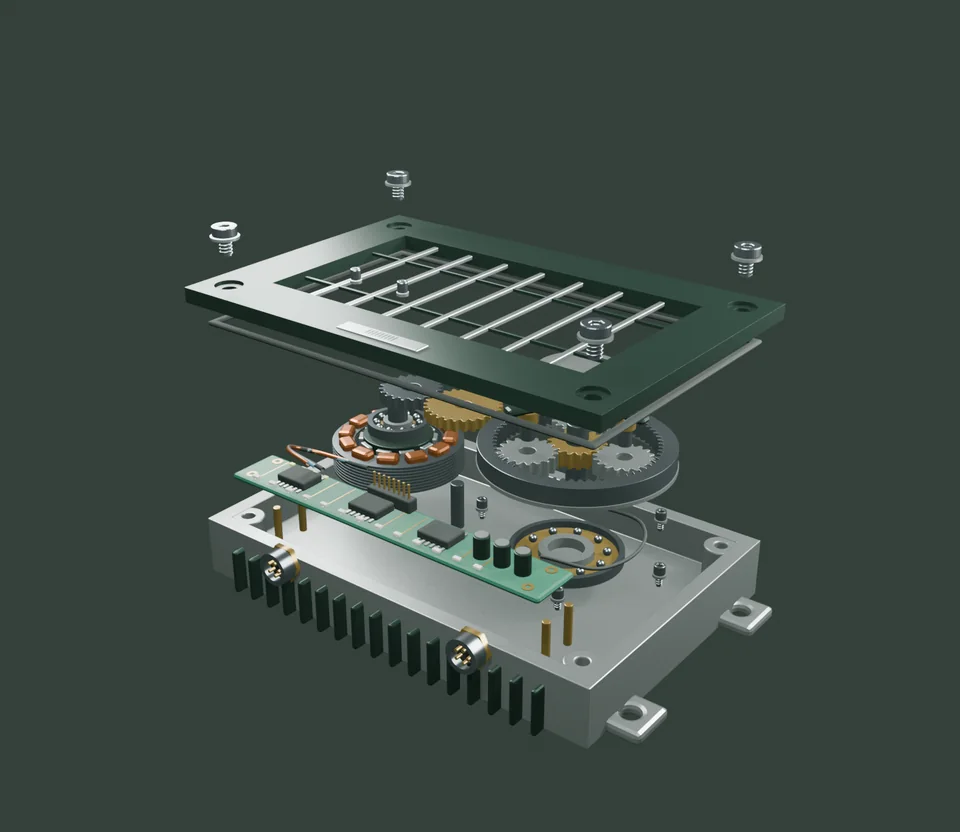
Explore six component groups and their assembly relationships.
Drag to orbit · Pinch to zoom · Arrow keys and +/− supported
Blender render · An illustrative 3D model explaining process structure.
STEP 01
Design review
Define function, use conditions and assembly relationships.
STEP 02
Part making
Choose materials and processes to suit the review purpose.
STEP 03
Assembly & finish
Review assembly interference and surface requirements.
STEP 04
Movement review
Review function against agreed conditions and record revisions.
Read every stage by scrolling. The process for a real project depends on its individual requirements.
EXPLORE THE DETAILS
A technical discussion starts with the details.
Select a number or a heading to explore a review topic. The marked areas are examples for explaining an enquiry.
01Assembly relationships
Describe the mating surfaces and the parts that will be assembled. Critical dimensions and datums are reviewed in the actual drawing.
02Surface references
Share priorities and references for colour, texture and coating. Colours in this diagram do not represent an actual material or finish quality.
03Review conditions
Describe whether appearance, assembly or movement needs review, and the intended environment. This illustration does not validate a real function or performance.
Include drawing revisions and changes with your enquiry.
COMPARE TWO VIEWS
One form. Two perspectives.
An explanatory comparison of exploded and assembled views. It does not depict a customer part or a manufacturing before-and-after result.
Separate the layers to examine their relationship.
Bring the layers of the same diagram together to examine its overall form.
Use the slider, number field or buttons. On the slider, arrow keys and Home/End also work.
Explore the exploded and assembled diagrams side by side. Both show the same explanatory illustration.
NEXT STEP